If your business numbers feel scattered across spreadsheets, bank feeds, invoices, and reports, financial visibility usually improves by simplifying the workflow first. ApexLedgerPro helps you centralize the day-to-day recordkeeping that supports clearer decision-making.
Visibility improves when bookkeeping becomes easier to trust.
Most businesses do not need more dashboards alone. They need a more reliable path from transaction entry to reports, invoice follow-up, and practical answers about what changed.
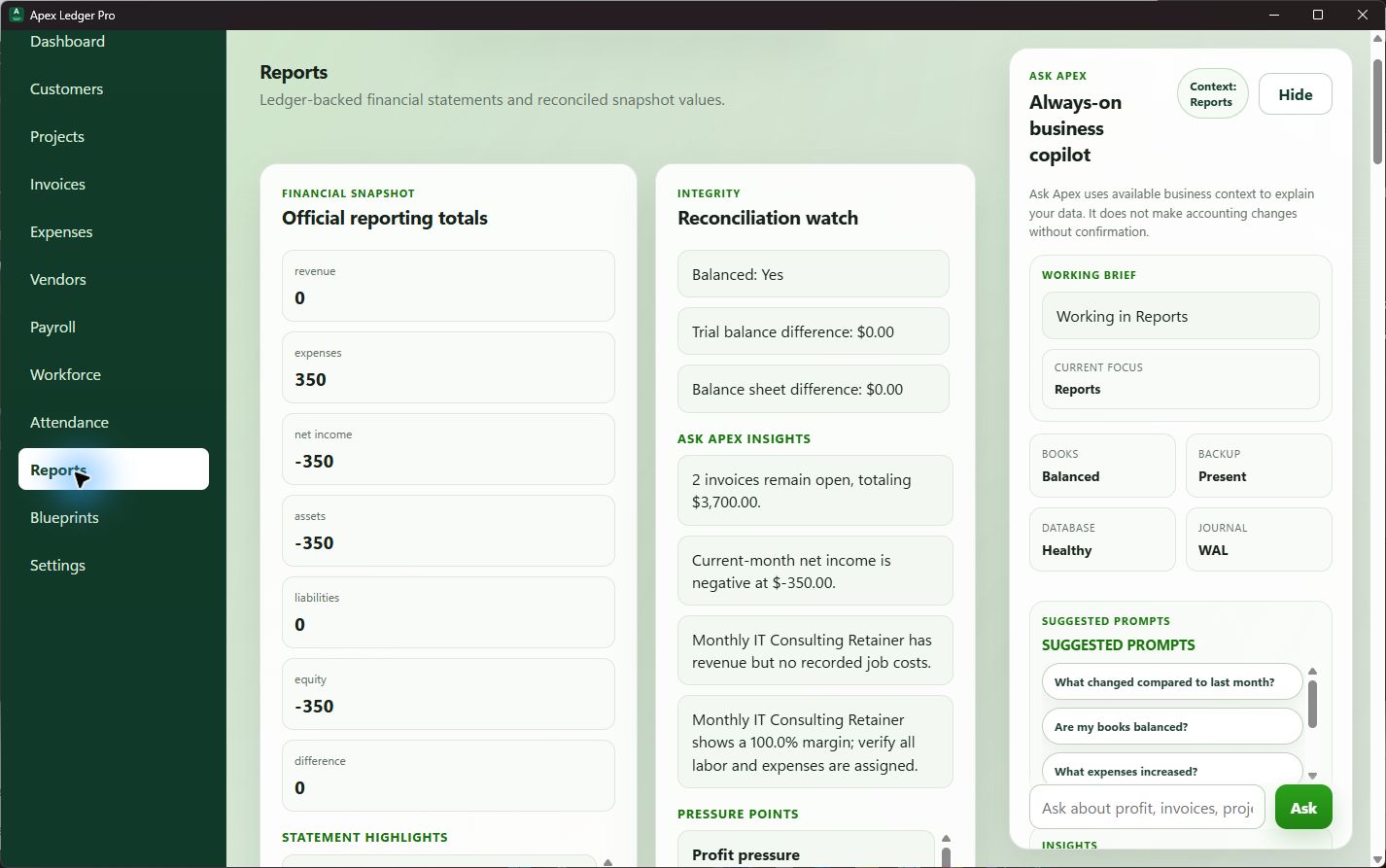
Keep one accounting source of truth
When invoices, expenses, journal entries, and reports all feed the same accounting workflow, it becomes much easier to trust the totals you are reviewing.
Review unpaid invoices weekly
Financial visibility drops fast when receivables are ignored. A regular overdue review helps you protect cash flow and understand where follow-up is needed.
Use plain-language explanations
Ask Apex can help explain report movement, expense changes, and business health signals in a more approachable way for busy owners.
How to improve financial visibility without adding more complexity
Start by reducing duplicate systems. Use one workflow for invoices, expenses, journal entries, and report review. Then standardize a short monthly review: open the Profit & Loss, check cash flow pressure, look for overdue invoices, scan large expense changes, and verify that the books still support the decisions you need to make. The software angle is covered more broadly on Financial Visibility Software for Small Businesses.
Use better visibility to make faster business decisions
When the accounting workflow is cleaner, owners can act faster on pricing, spending, customer follow-up, tax planning, and hiring. That is the real payoff. For more detail on common roadblocks, see Financial Visibility Challenges, then compare it with Clear Financial Visibility for Small Businesses for the day-to-day outcome you are trying to reach.
Financial visibility improves when the workflow stays connected.
This topic connects naturally with offline accounting software, desktop accounting software, and accounting software without subscription because better visibility comes from having your reports, invoices, and bookkeeping data in one place you actually control.
Learn how local desktop workflows help protect access to your business records. Desktop Accounting Software
See why a Windows desktop workflow can feel faster and more stable for daily accounting. Accounting Software Without Subscription
Explore one-time purchase positioning and data ownership benefits for small businesses.
Ask your books better questions.
Ask Apex helps small business owners turn financial visibility into practical decisions. Use it to ask questions like “Why was profit down this month?”, “What expenses increased?”, “Which invoices are overdue?”, or “What should I focus on first?” without losing the context of your local accounting records.
Explore the full financial visibility content cluster
Use these guides to understand profit faster, track cash flow, see unpaid invoices sooner, and reduce spreadsheet confusion with a more connected accounting workflow.
Frequently asked questions about how to improve financial visibility
How do you improve financial visibility in a small business?
You improve financial visibility by consolidating bookkeeping into one workflow, reviewing reports regularly, tracking unpaid invoices, watching cash flow closely, and using tools that connect accounting data to practical answers.
Why do spreadsheets make financial visibility harder?
Spreadsheets can be helpful, but they often create duplicate versions of the truth. When reports, expenses, and invoice tracking live in separate files, it becomes harder to know which numbers are current.
What reports help improve financial visibility?
The Profit and Loss, Balance Sheet, Trial Balance, General Ledger, receivables views, and expense summaries all help. The key is that they should come from the same accounting records.
Can AI help improve financial visibility?
Yes, when it is used carefully. Ask Apex can explain trends, highlight overdue invoices, and summarize business health, but the accounting records still need to be reviewed by the business owner.
See your numbers with more confidence.
Start with ApexLedgerPro Free for core accounting, invoicing, reporting, search, and backups. Upgrade to Founder Edition when you want deeper planning, forecasting, assets, and Ask Apex business insights.